
Your personal phone number is the primary bottleneck in your scaling strategy. Microsoft's current security protocols make it impossible to manage a high volume of digital assets without hitting "limit reached" errors or facing immediate account bans. You need a reliable way to verify multiple outlook accounts that doesn't involve buying crates of physical SIM cards or paying for hardware you'll only use once.
We know the frustration of losing accounts minutes after creation because of flagged verification data. This guide provides the technical blueprint to bypass these restrictions using virtual SMS activations. You'll learn how to source high-quality numbers, clear verification hurdles, and maintain a fleet of Phone Verified Accounts (PVAs) at a minimal cost.
This article covers the exact steps to secure your accounts before Microsoft's 2027 transition to Passkeys. Follow this process to build a scalable, automated system that prioritizes speed and anonymity.
Key Takeaways
- Identify Microsoft's specific verification triggers to convert standard registrations into stable, high-trust Phone Verified Accounts (PVAs).
- Execute the technical workflow required to verify multiple outlook accounts using premium virtual mobile numbers that bypass automated VoIP detection filters.
- Eliminate instant account bans by synchronizing your proxy locations with clean browser environments and localized SMS verification data.
- Scale your digital infrastructure efficiently using rapid one-time activations for bulk creation and long-term rentals for persistent account access.
- Bypass the high costs and logistics of physical SIM cards while maintaining total anonymity across an unlimited number of Outlook profiles.
Understanding Outlook Account Verification Triggers
A Phone Verified Account (PVA) is a Microsoft account that has successfully completed SMS authentication. This status is mandatory for any user looking to maintain a stable digital presence. Building a PVA fleet is the only way to ensure your marketing or development projects remain operational without constant interruptions. Unverified accounts face immediate restrictions, including reduced sending limits and frequent login challenges. Microsoft uses these triggers to distinguish between legitimate users and automated scripts.
You will see the "Verify your account" prompt during the initial signup or when the system detects a change in your login environment. Microsoft calculates a trust score for every new identity based on your IP address, browser metadata, and phone number history. You cannot verify multiple outlook accounts using a single personal number indefinitely. Most users find that Microsoft restricts a phone number after just two or three successful activations. Once you hit this limit, the system flags the number as overused, leading to account locks or mandatory manual reviews.
To better understand these verification hurdles, watch this technical breakdown:
Why Microsoft Demands a Phone Number
Microsoft enforces phone verification as a primary anti-spam tool. It forces a cost on account creation that bots cannot easily pay. This identity binding ensures that every account is linked to a unique mobile subscriber. It creates a friction-filled environment for anyone trying to build a large fleet of emails. Beyond spam prevention, phone numbers facilitate two-factor authentication (2FA). This security layer protects the platform from unauthorized access. Microsoft plans to retire SMS and voice codes for verification by February 1, 2027, moving users toward Passkeys and authenticator apps. Secure your accounts now to prepare for this transition.
The Limits of Physical SIM Cards
Managing physical SIM cards is a logistical nightmare for high-volume users. You must purchase hardware, pay for monthly maintenance, and manually swap cards for every activation. This process is slow and expensive. Physical SIMs also lack the anonymity required for secure operations. Many carriers require government ID for registration, which links your real-world identity to your digital assets. If one account is compromised, the shared phone number puts your entire network at risk. Physical cards don't scale; they create bottlenecks that stop your growth when you need to verify multiple outlook accounts at scale. Use virtual activations to remove these hardware dependencies. Visit RentalNumbers.com to secure numbers without the physical overhead.
The Role of Virtual Numbers in Multi-Accounting
Virtual numbers function as a cloud-based gateway for receiving SMS verification codes. They eliminate the need for physical SIM cards and hardware maintenance. This infrastructure allows you to verify multiple outlook accounts instantly from any location. The system works by routing the incoming SMS from a mobile carrier to a web-based dashboard. You see the code, enter it into Outlook, and finalize the account creation in seconds. This process is significantly faster than manual SIM swapping and allows for parallel account creation.
Microsoft's security filters specifically target VoIP (Voice over Internet Protocol) numbers because they are easily generated by bots. Using a low-quality VoIP number often results in an immediate account block. You must use non-VoIP mobile numbers that appear to the platform as legitimate carrier-issued lines. This distinction is critical for establishing a high trust score during the two-factor authentication process. High-reputation number pools ensure that your accounts aren't flagged as suspicious upon creation.
One-Time Activation vs. Long-Term Rental
Use one-time activations for rapid, high-volume account creation. It's the most cost-effective method for projects requiring hundreds of emails. If you manage high-value accounts that require frequent security checks, choose a long-term number rental. This ensures you can access the same number for future security prompts. Scaling to 10 or more accounts requires a mix of both strategies to balance cost and long-term stability. You can review the technical workflow to start building your account fleet with clean, mobile-tier numbers today.
Bypassing Regional Restrictions
Account trust depends heavily on geolocation consistency. If you use a proxy from the United Kingdom, you should select a UK-based virtual number. Mismatched data points trigger automated security reviews. RentalNumbers.com provides access to a global pool of over 125,000 numbers across more than 50 countries. Match your IP address to your number origin to reduce the risk of shadowbanning when you verify multiple outlook accounts. Check the current pricing for specific regions to optimize your scaling budget. This alignment creates a seamless digital identity that satisfies Microsoft's regional verification checks.
Comparing Verification Methods for Outlook
To verify multiple outlook accounts efficiently, you must evaluate three primary logistics models: physical SIM cards, free public SMS services, and premium virtual activations. Physical SIMs offer high reliability but fail on speed and cost. Free services appear convenient but rarely pass Microsoft's modern security filters. Premium virtual numbers provide the only viable path for professional users scaling to dozens or hundreds of accounts. Your choice of method directly impacts the longevity of your digital assets.
Why Free SMS Services Fail
Public SMS sites are a significant security risk. Microsoft maintains an extensive database of known public number pools and blacklists them automatically. When you attempt to use these numbers, you'll likely encounter "This phone number has been used too many times" or "We don't support that carrier" errors. These platforms aren't private. Anyone monitoring the public dashboard can see your verification code. This exposure allows third parties to compromise your account before you even finish the setup. High failure rates and lack of privacy make these tools useless for professional scaling.
The Efficiency of Premium Virtual Numbers
Premium activations are the industry standard for creating Phone Verified Accounts (PVAs). Unlike public pools, these numbers are private. They're assigned to a single user for the duration of the activation. This exclusivity prevents the "already in use" errors common with free tools. Professional services utilize mobile-tier number ranges that bypass the VoIP filters mentioned in previous sections. This results in a near 100% success rate for Outlook signups when combined with clean browser fingerprints.
Delivery speed is another critical factor. Premium dashboards provide the SMS code in under 60 seconds. This allows you to maintain a rapid creation rhythm that's impossible with physical hardware. You can manage your entire verification history through a single interface. This ensures no codes are lost during the process. For those managing a growing fleet, checking the current rates per activation allows for precise budget forecasting. Using a dedicated activation service ensures your accounts remain linked to high-reputation data points from the start.
Reliability across different regions is also superior with premium tools. You can select numbers from specific countries to match your target market. This consistency builds a stronger identity profile for your accounts. While physical SIMs require international shipping and roaming fees, virtual numbers provide instant global access. This flexibility is essential for bypassing regional restrictions and maintaining a distributed account network.
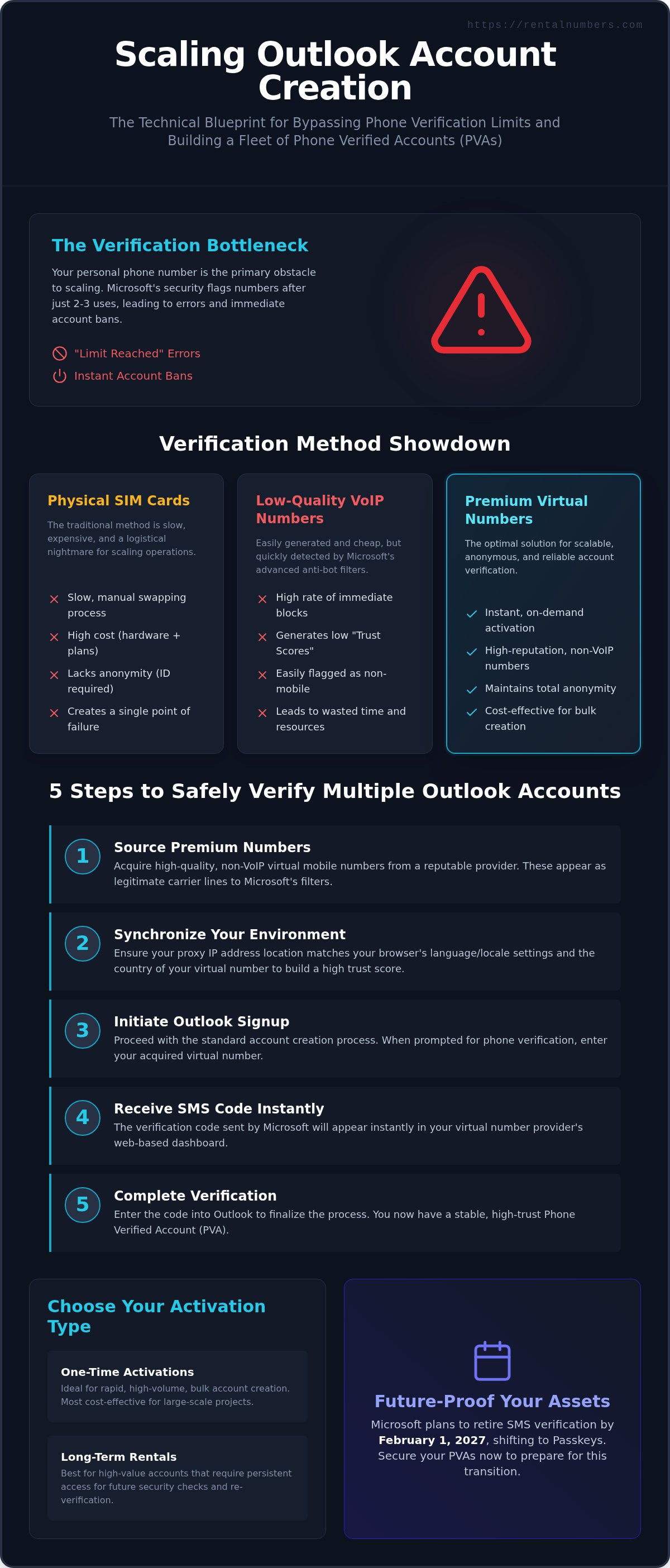
5 Steps to Verify Multiple Outlook Accounts Safely
To verify multiple outlook accounts without triggering security flags, you must follow a strict isolation protocol. Microsoft tracks your digital footprint across several data points. Failure to mask these identifiers leads to immediate account termination. Follow this five-step technical workflow to build your account fleet securely.
- Prepare your environment: Launch an antidetect browser to create unique hardware fingerprints for each profile.
- Rotate your IP: Assign a dedicated proxy to each account profile to ensure geographic consistency.
- Initiate Outlook registration: Navigate to the signup page and enter your credentials until you reach the phone verification screen.
- Activate a virtual number: Use a professional activation service to obtain a clean, mobile-tier number.
- Complete verification: Input the received SMS code and finalize the security settings to confirm the account.
IP and Fingerprint Management
Microsoft's security algorithms detect patterns in account creation. Using the same IP address for more than two signups triggers an automatic block. A proxy acts as a digital shield for your IP, allowing you to appear as a unique user from a specific location. Combine these proxies with an antidetect browser to isolate your cookies, canvas data, and fonts. This combination creates a clean identity that passes automated checks. Ensure your proxy location matches the country of your virtual number to maintain high trust scores.
Executing the SMS Activation
Efficiency is critical when managing bulk registrations. Log in to the RentalNumbers.com dashboard to initiate the process. Select Microsoft or Outlook from the service list to ensure the system routes your request through optimized number pools. This selection is vital because it filters for numbers known to work with Outlook's specific SMS gateways. Once you request a number, copy it into the Outlook verification field immediately.
If a code doesn't arrive within 60 seconds, don't wait indefinitely. Use the cancel and retry strategy. Cancel the current activation to refund your balance and immediately request a new number. This keeps your workflow moving and avoids bottlenecks. Once the code appears in your dashboard, paste it into the Outlook prompt to finish the setup. You can start your first activation now to test this workflow in real-time. Finalize your account by setting up a recovery email and saving your login metadata for long-term access.
Scaling Your Infrastructure with RentalNumbers.com
Scaling a digital fleet requires centralized SMS logistics. RentalNumbers.com acts as your command center for this operation. You can verify multiple outlook accounts at scale by bypassing the manual limitations of physical hardware. The platform tracks every activation in a single utilitarian dashboard. This history log allows you to audit your account creation timeline and troubleshoot potential flags. This ensures you never lose a verification code during bulk operations, even when managing hundreds of profiles simultaneously.
High-value accounts require persistent access to security prompts. Use Long-Term Rentals for your primary administrative profiles. This allows you to receive future two-factor authentication codes if Microsoft triggers a security check during a login from a new location. Decoupling your personal identity from these accounts is a 2026-ready privacy standard. It prevents large platforms from mapping your entire digital footprint to a single person. You maintain total anonymity while building a robust, professional infrastructure.
Automating the Process
Expand your infrastructure across different platforms simultaneously to build a complete marketing ecosystem. The same system that verifies Outlook also supports Gmail activations. This multi-service capability allows you to sync identities across different providers without leaving the dashboard. Maintain account health by establishing consistent login patterns for each profile. Sudden shifts in activity or frequent IP changes can trigger manual reviews. Keep your Wallet topped up with credits to prevent delays during high-intensity creation phases. Rapid fulfillment depends on having ready capital in your account to snag fresh numbers as they become available.
Security and Privacy Best Practices
Avoid the common mistake of overusing recovery numbers. Never link more than two accounts to the same recovery phone number or secondary email. This isolation strategy prevents a single ban from cascading through your entire network. Virtual numbers provide a defensive layer against aggressive data harvesting. They ensure your real-world mobile subscriber data remains private and unlinked from your business activities. Use the following final checklist for every secure, multi-account setup:
- Assign a unique proxy: Match the IP address to the account's intended region.
- Use a dedicated profile: Keep browser fingerprints and cookies isolated in an antidetect tool.
- Document credentials: Store login data and number history in an encrypted manager.
- Enable 2FA: Use the virtual number to secure the account immediately upon creation.
This structured approach turns account creation into a predictable technical process. You gain total control over your digital assets while maintaining maximum anonymity. By treating verification as a logistics task rather than a hurdle, you can scale your operations to any size without fear of platform restrictions.
Deploy Your Outlook Fleet Today
Scaling your digital infrastructure requires moving beyond physical hardware limitations. You now have the technical blueprint to verify multiple outlook accounts using high-reputation virtual activations that bypass standard carrier filters. By isolating your browser environments and matching your proxy locations to your number origin, you eliminate the primary triggers for instant account bans. This process ensures your real-world identity remains secure while your professional operations grow.
Efficiency in 2026 depends on having the right SMS logistics tools. Use a centralized platform to manage your verification history and maintain long-term account stability. With worldwide number availability and secure one-time activation fees, you can build a robust network of Phone Verified Accounts (PVAs) without the logistical nightmare of physical SIM cards. Access every code through a no-nonsense utilitarian dashboard designed for maximum speed.
Get your first Outlook verification code in 60 seconds. Start building your scalable infrastructure today and take control of your digital privacy.
Frequently Asked Questions
How many Outlook accounts can I verify with one virtual number?
Microsoft typically allows you to link a single phone number to approximately 2-3 accounts before triggering a "number overused" error. For a professional scaling strategy, you should use one unique virtual number per account. This isolation prevents a single flag from compromising your entire network. If you need to verify multiple outlook accounts at scale, use one-time activations to assign a fresh mobile identity to every new profile you create.
Does Microsoft block virtual numbers for account verification?
Microsoft filters for VoIP identifiers and often blocks numbers from low-quality public pools. The platform requires mobile-tier numbers that appear as legitimate carrier-issued lines to pass its security gates. RentalNumbers.com provides these high-reputation mobile numbers to ensure your activations succeed. Avoid using free SMS sites; these numbers are already blacklisted by Microsoft's automated security systems, leading to immediate account locks or registration failures.
What is the difference between a one-time activation and a rental?
A one-time activation provides a single SMS code for a specific service at a low, fixed fee. It's the most efficient choice for rapid account creation. A long-term rental gives you exclusive access to a number for weeks or months. Rentals allow for unlimited inbound SMS messages during the rental period from multiple services. Use rentals for high-value accounts that might require recurring two-factor authentication checks during future logins or security updates.
Can I use the same virtual number for Outlook and other services?
You can use the same number for multiple platforms if you choose a long-term rental. This allows you to verify Outlook, Gmail, and social media profiles using a single digital identity. One-time activations are restricted to the specific service you select at the time of purchase. If you need to verify multiple outlook accounts alongside other platforms, managing them through a long-term rental provides better identity consistency across your entire digital fleet.
What should I do if Outlook doesn't send the code to my virtual number?
Cancel the current activation through your dashboard if the code doesn't arrive within 60 seconds. This action automatically refunds the credits to your wallet. Request a new number immediately and re-initiate the verification process in Outlook. Delays usually happen due to temporary carrier routing issues or Microsoft's internal SMS gateway bottlenecks. Switching to a fresh number from a different range or country often resolves the delivery problem instantly.
Are virtual numbers for Outlook legal to use?
Virtual numbers are legal digital identity tools used globally for privacy and security. They act as a defensive layer that allows you to bypass the aggressive data collection practices of large platforms. Using these tools doesn't violate any laws; it simply provides a way to maintain anonymity while managing your online assets. Many professionals use them to separate their personal contact information from their business accounts and marketing infrastructure.
How long does it take to get an SMS verification code?
Most users receive their SMS verification code in under 60 seconds through the centralized dashboard. The system monitors the incoming carrier signal in real-time and displays the code as soon as Microsoft releases it. If you don't see the code within two minutes, it's more efficient to cancel and try a different number. This rapid fulfillment cycle ensures you can create and verify dozens of accounts in a single work session.
Can I recover my account later using a temporary virtual number?
Account recovery is only possible if you have an active long-term rental for that specific number. One-time activation numbers are released back into the pool after your session expires and cannot be accessed again. For accounts that hold significant value, always choose a long-term rental or set up an alternative recovery method like an authenticator app or a backup email. This ensures you don't lose access if Microsoft demands a new check.