Managing five smartphones for five separate customer support lines is a resource drain. Most growth-focused teams eventually hit a wall where physical SIM cards and expensive mobile contracts become a bottleneck for scaling. If you need to operate multiple WhatsApp Business accounts without the hardware clutter, you must shift to a digital-first infrastructure. Relying on personal phone numbers creates unnecessary privacy risks and tethers your professional identity to a physical chip that can be lost or compromised.
You already know that the traditional one-phone-one-account model is inefficient for modern operations. This guide provides a technical roadmap to set up and manage multiple WhatsApp Business accounts using secure virtual numbers. Discover how to eliminate hardware dependencies, maintain complete data privacy, and utilize instant SMS verification to get your accounts live in minutes. We outline the transition from physical hardware to a scalable, virtualized communication system designed for 2026 performance standards.
Key Takeaways
- Scale your operations by segmenting departments and establishing a local presence in 100+ countries without physical hardware.
- Discover the technical process for verifying multiple WhatsApp Business accounts without acquiring additional physical SIM cards.
- Identify the optimal use cases for one-time activations versus long-term rentals to maintain persistent account access.
- Centralize your digital identity management using a wallet-based credit system and a unified verification dashboard.
- Eliminate privacy risks by decoupling your professional communication from personal phone numbers through secure virtual gateways.
Why Manage Multiple WhatsApp Business Accounts?
Growth-oriented businesses often outgrow the limitations of a single communication channel. Managing support inquiries and sales leads through one number creates operational friction and slows response times. Scaling effectively requires multiple WhatsApp Business accounts to segment traffic by department or region. This strategy ensures that high-priority sales leads never wait behind routine support tickets. Utilizing the WhatsApp Business framework allows for this segmentation, but the app traditionally demands a unique phone number for every account created.
Establishing a local presence is another critical driver for account expansion. International customers show higher engagement when messaging numbers with familiar country codes. Regional virtual numbers allow you to build trust in over 100 countries without the cost of physical offices. You can centralize these global operations on a single interface, removing the need to juggle multiple handsets or manage complex hardware rotations.
To better understand the official method for managing more than one account, watch this helpful video:
The Privacy and Professionalism Barrier
Professionalism depends on clear boundaries. Using a personal phone number for business exposure leads to significant privacy leaks. Public business directories and social media scrapers often harvest these numbers, resulting in a constant stream of marketing spam. A dedicated virtual number acts as a defensive layer for your digital identity. It keeps your personal contacts separate from professional leads. You maintain a polished brand image while ensuring your private data remains off the public record. This separation is essential for maintaining control over your professional availability.
Scaling Without Hardware Constraints
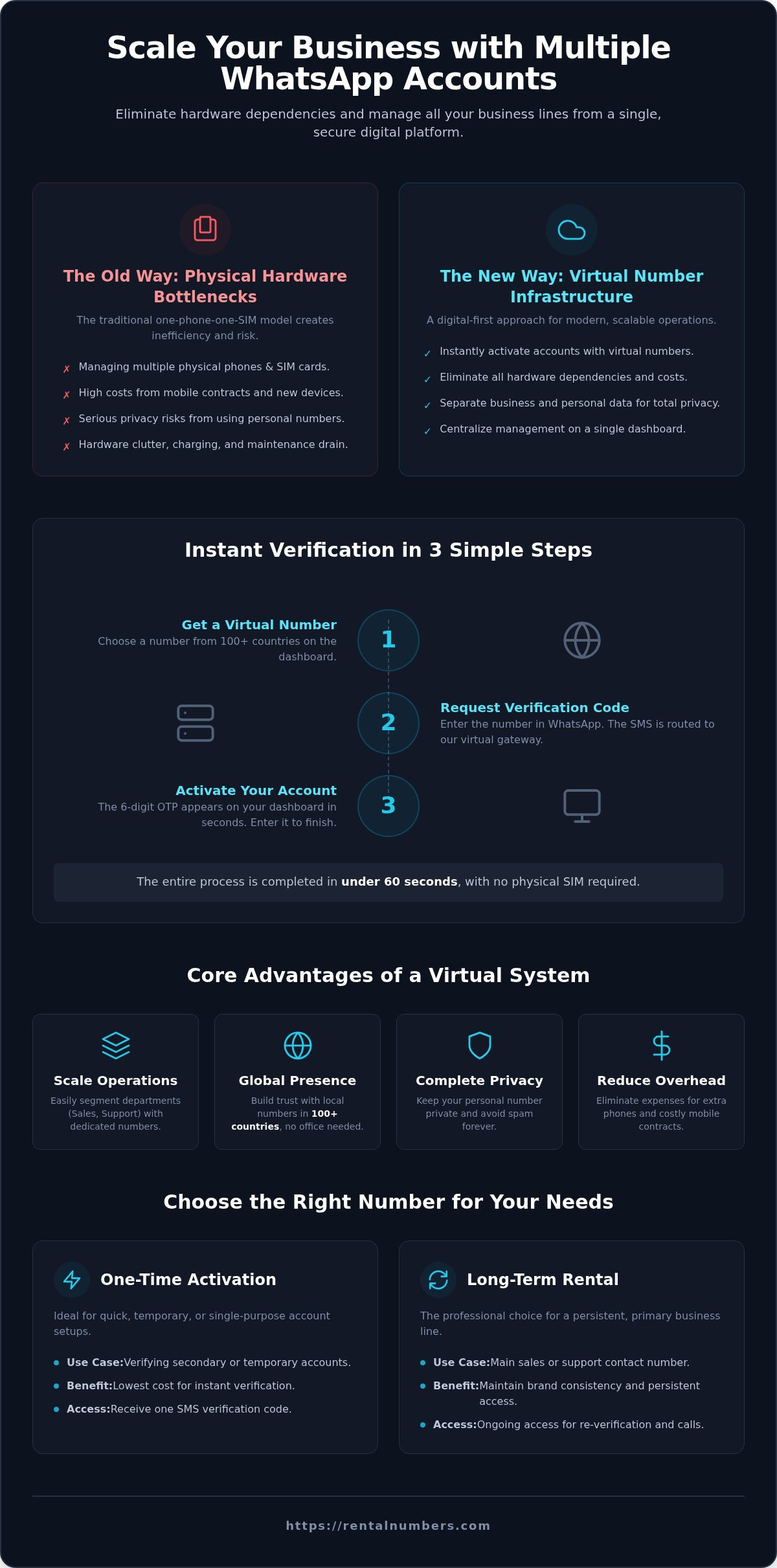
Physical hardware is a legacy bottleneck for modern communication. Purchasing dual-SIM phones or extra handsets for every new department is expensive and inefficient. It creates a cluttered environment where devices must be charged, updated, and physically secured. Virtual numbers remove these barriers entirely. You can add new business lines in under 60 seconds through a centralized dashboard. This system drastically reduces overhead by eliminating traditional mobile contracts and handset costs. To begin scaling your infrastructure, you can secure a virtual number for WhatsApp and activate your secondary account immediately.
How Virtual SMS Verification Enables Multiple Accounts
Running multiple WhatsApp Business accounts requires a reliable method to bypass the one-SIM-per-app restriction. Most generic guides suggest app cloning or dual-messenger features but fail to explain how to acquire the necessary verification codes. Virtual numbers provide the technical solution. These numbers act as digital endpoints for global SMS gateways, allowing you to receive official verification traffic without a physical SIM card or a cellular signal. This infrastructure allows you to treat phone numbers as software assets rather than physical liabilities.
The Virtual Gateway Mechanism
The verification process follows a linear, secure path. When you initiate a new account setup, WhatsApp dispatches a 6-digit One-Time Password (OTP) to your assigned number. Instead of traveling to a local cell tower, this SMS packet is intercepted by a high-speed digital gateway. RentalNumbers.com captures this incoming data in real-time and routes it directly to your user dashboard. You retrieve the code from the secure 'History' tab and enter it into the app. This system utilizes secure protocols to ensure that the delivery is both instant and private. It removes the latency often associated with traditional roaming or weak cellular reception. The wallet-based credit system ensures that you only pay for the activations you need. This utilitarian approach prioritizes speed and cost-efficiency. You can fund your account, select a service, and receive your code in under 60 seconds.
Bypassing Physical SIM Limitations
Traditional mobile contracts tether your business identity to a physical chip. This hardware dependency limits your ability to scale. Virtual verification allows you to access numbers from 100+ countries regardless of your current location. You can manage multiple WhatsApp Business accounts for global regions through a single web-based interface. This is particularly useful for hardware that lacks a SIM card slot, such as tablets or dedicated business laptops. You don't need to worry about losing a physical card or managing a drawer full of handsets. This streamlined workflow is essential for businesses that need to deploy new communication lines rapidly to meet customer demand. For those comparing different technical setups, you can find Every Option Explained in recent industry documentation. If you are ready to eliminate hardware clutter, select a virtual number and complete your first verification today.
One-Time Activation vs. Long-Term Number Rental
Selecting the correct verification model is essential when deploying multiple WhatsApp Business accounts. Your choice depends on the intended lifespan of the account and your budget for communication infrastructure. One-time activations offer a rapid, low-cost entry point for initial account setup. Long-term rentals provide the persistent access required for high-stakes business lines. You must choose between a temporary bypass for quick verification or a permanent presence for ongoing customer engagement. Evaluate your operational requirements before selecting a service on the RentalNumbers.com Pricing page.
Choosing One-Time Activations for Setup
One-time activations are designed for immediate, single-use verification. This method is the most cost-effective path for users who need to bypass the initial registration wall without committing to a monthly subscription or long-term contract. It's best for secondary support lines or experimental marketing accounts where ongoing re-verification isn't a priority. You avoid the recurring overhead of physical SIM maintenance while gaining instant access to the platform. Use this service to create a profile in under 60 seconds and begin messaging immediately. Check the Numbers list to find instant availability for your target region. If WhatsApp requires a security check later, you won't have access to this specific number again. Only use this option for accounts where the risk of losing the number is acceptable for your workflow.
The Advantage of Long-Term Rentals
Professional brands require stability and a consistent digital identity. Long-term rentals allow you to keep your virtual number for as long as you maintain the subscription. This persistent access is critical because WhatsApp occasionally triggers re-verification requests during device updates or security audits. Losing access to your verification number can result in being locked out of your business chats and losing your message history. A Long-term Rental ensures you can always receive a new OTP to restore your account. This model also allows you to use the same number for Multi-Service Verification across different platforms, consolidating your brand's presence. It functions as a reliable defensive layer for your communication system, protecting your investment in customer relationships. Choose this tier if your multiple WhatsApp Business accounts are central to your daily revenue generation and customer support operations.
Step-by-Step: Setting Up Your Secondary Business Account
Establishing multiple WhatsApp Business accounts requires a precise execution of the verification sequence. This technical workflow eliminates the friction of physical SIM acquisition and hardware management. You can control the entire lifecycle of your business lines through a single digital interface. Follow these steps to activate your secondary account in under 60 seconds without needing a physical handset for the new number.
Funding Your Virtual Wallet
Access your account and select the Wallet option to initiate a credit deposit. We support various secure payment methods for instant funding. Verify that your balance is sufficient for the specific country and service tier you require. Credits are applied to your account balance instantly. This utilitarian approach ensures you can deploy new communication lines the moment your business needs expand. You don't need to manage separate invoices or mobile contracts for every number you acquire. The system maintains a clear log of all transactions for your accounting records.
Navigate to the service selection menu once your wallet is funded. Choose 'WhatsApp' from the list of supported platforms. Filter by country to find the regional code that matches your business target. Click the purchase button to secure your activation. The system displays the virtual number immediately on your screen. Copy this number to your clipboard for use in the app registration process.
Completing the WhatsApp Verification
Launch the WhatsApp Business app on your device. Set the country code to match your virtual number exactly. Input the digits and request the verification code via SMS. Return to your RentalNumbers.com dashboard and navigate to the 'History' section. The 6-digit OTP will appear as soon as the global gateway processes the message. This delivery is typically instantaneous. Enter this code into the app. Your profile is now active and ready for configuration. You can now manage multiple WhatsApp Business accounts from a single device without hardware clutter or signal issues.
Ensure you have a stable internet connection before initiating the request. The 6-digit code is delivered privately through our secure global gateway. Once verified, you can immediately configure your business profile, including automated greetings and product catalogs. This method allows you to verify accounts on devices that do not support physical SIM cards, such as tablets or laptops. Secure your virtual number to activate your professional account today.
Scaling and Managing Your Business Infrastructure
Scaling a digital communication network requires more than just initial setup. You must maintain a centralized system to track every activation and ensure security across multiple WhatsApp Business accounts. Use the unified user dashboard to monitor your complete verification history. This transparency allows you to manage renewals for long-term rentals and prevent service interruptions. Deploying numbers in diverse geographic markets ensures your brand maintains a local presence wherever your customers operate. This strategic expansion is impossible with physical SIM cards but remains effortless through a virtualized gateway.
Efficiency is the primary driver of growth. Managing dozens of accounts manually creates administrative bottlenecks that slow down your response times. A tool-first approach prioritizes speed and accuracy. By centralizing your numbers, you eliminate the need for physical hardware audits and reduce the risk of losing access to critical business data. Every number you acquire becomes a manageable asset within your digital stack.
Leveraging the AI Assistant
Use the AI Assistant to manage complex account tasks with minimal manual input. This tool is designed to automate routine workflows and reduce the friction in your digital communication stack. It handles the technical stages of account management so your team can focus on core operations. Scaling your business shouldn't mean increasing your administrative time. The AI Assistant acts as a silent partner in your infrastructure. It ensures that your system remains technically competent and ready for rapid expansion. Implementation is direct and requires no complex coding.
Multi-Service Verification Strategy
Don't limit your professional reach to a single platform. A comprehensive digital strategy requires presence across several channels. Use our global gateway to verify additional platforms like Telegram or Instagram. You can apply the same wallet-based credit system to secure verification codes for LinkedIn and Facebook. This multi-service approach centralizes your digital identity management for maximum efficiency.
Decoupling your professional profiles from a personal phone number provides a necessary defensive layer. It protects your privacy while allowing you to manage multiple WhatsApp Business accounts and other social profiles from one location. For a deeper technical strategy, refer to our Virtual Number for WhatsApp guide. Maintaining a consistent and secure digital identity is the foundation of modern business communication. Centralize your verification tasks today to build a scalable, hardware-free infrastructure.
Scale Your Business Communication Infrastructure
Establishing multiple WhatsApp Business accounts is the essential standard for 2026 operations. You now have the technical roadmap to eliminate physical SIM cards and redundant hardware from your daily workflow. Transitioning to a virtualized infrastructure protects your digital privacy and centralizes your communication management. Use one-time activations for rapid setup or long-term rentals for persistent brand identity across global markets.
Operational efficiency depends on speed and technical reliability. Our system provides global gateway access for instant SMS verification to ensure your accounts go live without delay. Manage your account credits through secure wallet deposits to maintain a friction-free, utilitarian workflow. This approach allows you to deploy new business lines across 100+ countries in under 60 seconds. You're no longer tethered to local cellular signals or physical chip limitations.
Take control of your professional identity and scale your departments without hardware bottlenecks. Get your virtual number for WhatsApp Business now and begin building your scalable communication network. Your digital infrastructure is ready for immediate deployment.
Frequently Asked Questions
Can I use multiple WhatsApp Business accounts on one phone?
Yes, you can run multiple WhatsApp Business accounts on a single device by using the app's built-in account switcher or cloning tools. Each account requires a unique phone number for verification. Virtual numbers provide these identifiers without the need for additional physical hardware. This allows you to segment your departments or regional presence while maintaining a streamlined mobile workspace. It's a highly efficient solution for growing teams.
Will WhatsApp ban my account for using a virtual number?
WhatsApp permits virtual numbers as long as you adhere to their Business Messaging Policy. Bans usually result from spamming or automated messaging rather than the number type itself. Using a secure global gateway ensures your number passes the initial security audit successfully. Always obtain user opt-in and respect the 24-hour service window to maintain a high trust score. This keeps your professional communication lines active and secure.
How quickly will I receive the verification code?
Verification codes are delivered almost instantly through our high-speed digital infrastructure. Most users receive and input their 6-digit OTP in under 60 seconds. The code appears directly in your secure 'History' tab on the dashboard. This speed eliminates the latency often found with traditional roaming or physical SIM card delivery in remote locations. It's a utilitarian solution designed for rapid account deployment without the wait times of traditional carriers.
Do I need a physical SIM card for the virtual number to work?
You don't need a physical SIM card or a cellular signal for this service. Virtual numbers act as digital endpoints that capture incoming SMS traffic via a web-based interface. This allows you to verify multiple WhatsApp Business accounts on tablets, laptops, or smartphones that lack a SIM slot. It removes hardware dependencies and simplifies your communication stack. You can manage your global presence from any location with an active internet connection.
Can I use a virtual number for WhatsApp Business for free?
Reliable business verification requires paid infrastructure to ensure number exclusivity and security. Free virtual number services are frequently blacklisted by major platforms or shared among thousands of users. This leads to immediate account flags or failed registration attempts. Investing in a private activation or rental ensures your business line remains secure and professional. It's a necessary step for any brand that values data privacy and long-term account stability.
What happens if the SMS code does not arrive?
If the OTP doesn't appear within two minutes, check that you entered the correct country code in the app. You can cancel the request and select a different number from the dashboard at no extra cost. Credits are only deducted once a successful SMS is received and displayed. This ensures you only pay for completed verifications. It's a friction-free process that prioritizes your time and budget during the setup phase.
Is the virtual number permanent or temporary?
We offer both temporary and persistent options to suit your specific needs. One-time activations are designed for a single verification task during initial setup. Long-term rentals provide ongoing access to the same number for weeks or months. Choose a rental if you anticipate future re-verification requests or need to maintain a consistent digital identity. This persistent access acts as a defensive layer for your account against security audits or device updates.
How do I add credits to my RentalNumbers.com wallet?
Navigate to the 'Wallet' section of your user dashboard to deposit funds. Choose from our supported secure payment methods to add credits to your balance. The system updates your total immediately upon successful transaction. You can then use these credits for one-time activations, long-term rentals, or AI assistant tasks without further manual billing. This wallet-based system allows for rapid response when you need to deploy new communication lines quickly.